GIFbait ๐ŸŽฃ

Have you ever heard of clickbait? You know, those ads that say “Click here for your $200 Walmart gift card!” Admit it, even if just to yourself, you’ve clicked on some sort of clickbait once in your life. For me, it’s the shopping ads that appear in my social media feeds. I can’t tell you how many of those I fall for.

How about some GIF bait? What is GIF bait you ask? Well, aside from a cute fish pun, it’s using GIFs to engage your learners.ย  GIFs are fun, and are everywhere! Even when we text, we have a GIF menu. Our learners love using apps such as Snapchat or TikTok to make short videos, similar to GIFs. GIFs can engage!! If you’re unsure how to use or create GIFs, give a read below for some great ideas!

Brush Ninja

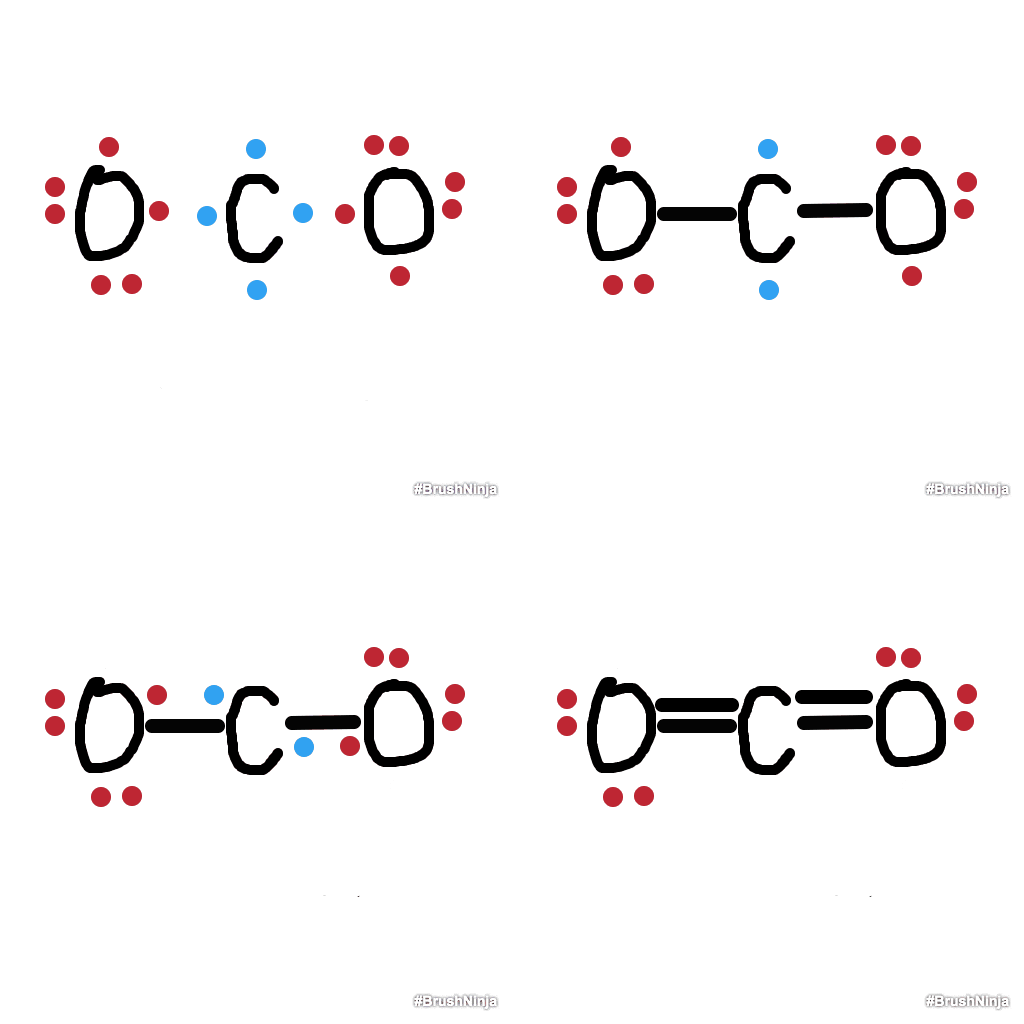
Brush Ninja is SUCH a fun tool! Not only it is engaging, it is also very user-friendly and doesn’t even require a sign-up or login. Anytime I’ve seen students use it, they love it! Personally, I like to use it to show cycles – but you could create a GIF on anything really.ย  Recently, Kelly DeMolles, a High School Science Teacher here in East Bridgewater, explored this tool to show Chemical bonds. She really enjoyed using it and plans to do so with her students as a way to demonstrate knowledge. See her example below!

For an overview on Brush ninja, watch the tutorial video included below:

If you’re looking for more, this is a great article by Richard Byrne of how to combine Brush Ninja and Google Slides for a beautiful presentation.

Tall Tweets

Another amazing Gif Creator, that doesn’t require drawing, is Tall Tweets. Basically, design what you would like to animate in Google Slides.ย  Then, go to Tall Tweets and add your slides. From there, you can alter the settings of how fast you want your Gif to move. I took a GIF and made it my Google Classroom Background! Tall Tweets comes in handy with screenshot Gifs too for instructions. The Gif below was created from these slides (click here) if you’d like to see how it works!


Take a look at the quick tutorial below on how to use this tool!

Text Gif Generators

Glitter Text Online

Perhaps a favorite of many around here is Glitter Text Online. It is EXACTLY what it sounds like – you write the text, and you pick the glitter! You can customize this in so many ways and then copy and paste it wherever you’d like!ย  Here’s an example below:

Typing Generator

Sometimes I like the look of typing text.ย  This is a great site where you can generate a Gif that looks like you’re typing!

Where to find already-made GIFs

When I need a good GIF or Sticker, I go to GIPHY.ย  Personally, I like the sticker option on the site more so than the GIF option.ย  You can check out the site here and feel good about what you use because it is all copyright free! You can even create them here if you’d like!

 

My Challenge to you:

Create some BAIT! Want to engage kids? Put a GIF on the assignment or step it up a notch and CREATE one! Let me know how it works out!

Take Care Everyone!
oFISHally Yours,
Erin Fisher ๐ŸŸ ๐ŸŸ ๐ŸŸ

BREAKOUT of the fish tank! ๐Ÿ”๐ŸŸ

Bitmoji Image

Happy November! I can’t believe we finished out October already! We are in the middle of possibly the longest stretch of school that we have all year. September to December has minimal break time and we can get so much accomplished! However, with the changing of the clocks, the increased darkness, and the colder weather it can start to feel a bit mundane, even a bit overwhelming.ย  We may need to think of a different way to excite ourselves, and our students, at this time of year. How can we turn the regular routine into excitement? How can we “breakout” of that boring, comfortable fish tank? Well, I have the answer for you!

Have you heard of Digital Breakouts?!ย  Certainly, this is not a new concept as it has been around for a few years, but Breakouts with Google Tools appear to be on the rise! What is a Breakout you ask? It’s similar to an Escape Room, but rather than escaping students try to solve puzzles and riddles in order to escape the “digital” room or unlock the final lock.ย  You can set the stage with all different scenarios. Each area may have a puzzle to solve, like this one (click here). With each challenge solved, a clue is given for the greater escape!

Take a look below to see an amazing example of a Digital Escape and various resources on where to find them, or how to make them yourself!

A SPOOKTACULAR Example

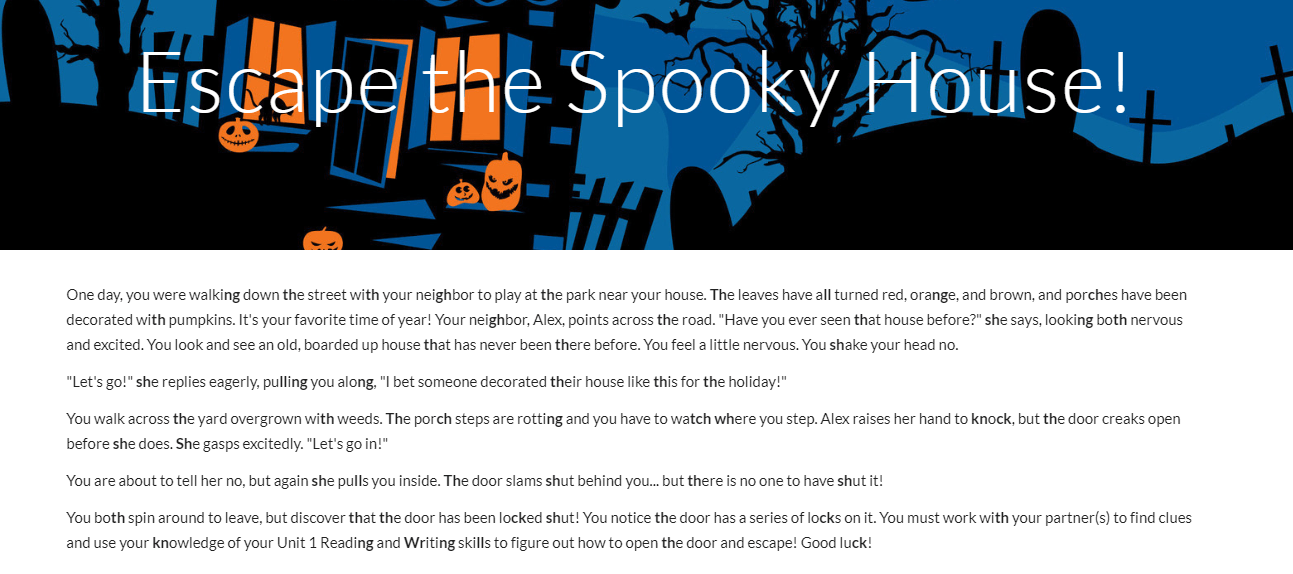
Still not sure what a Digital Escape is? Well, check this one out! Taylor Almeida created a very sophisticated Breakout using Google Sites, Google Draw, Google Forms, and Google Sheets!ย  I had the fortunate opportunity to watch second graders solving the puzzles. They did an AMAZING job and EVERYONE was excited and on task!ย  This Escape is so much fun AND allows students to practice skills in a different way!

Click here to try it out: https://sites.google.com/view/escape106

Digital Breakouts – a How-To

Erin Foley is a Technology Specialist and Teacher at Hanover Public Schools. Recently, she gave a session at the MassCUE Fall Conference which you can see below. This presentation gives step-by-step directions on how to create your own escape using all FREE Google Tools! One of our own EB teachers (Taylor) attended this great session and immediately implemented it in the example above!

You can find Erin Foley on Twitter at @ErinFoleyEdTechย ย or on her website http://erindfoley.com/

Marisa Foley and Leanne DiPesa of Medfield also presented on Digital Breakouts.ย  They included testimony from students as well in their presentation. This is another take on how to create a Digital Breakout! For more, find Marissa and Leanne on Twitter @Marissafoley325 and @MsDiPesa.

Want to try a Breakout or Digital Escape, but feeling a bit overwhelmed?ย  Reach out and I’d be happy to assist you in making one or even make one for you! Don’t be afraid to “breakout” of the Fishtank!

Take Care Everyone!

oFISHally Yours,
Erin Fisher ๐ŸŸ ๐ŸŸ ๐ŸŸ